
Guide
Smart irrigation system: automatic irrigation for parks and cities
A smart irrigation system waters by real need, not by a fixed calendar. ESTRON makes that decision with AI and sends it over LoRaWAN to battery-powered valve controllers.
- What is it?
- How it works
- Automatic or smart?
- Components
- Installation
- Savings
- Comparison
- Remote control
- Investment
What is a smart irrigation system?
A classic automatic irrigation system runs on a timer. It waters at the same time, for the same duration, every day. Rain does not change the schedule.
A smart irrigation system reverses this logic. It looks at the site first, then decides whether to water. Weather forecast, soil moisture and plant condition are re-evaluated every day.
In ESTRON the decision maker is AI. Each irrigation line gets its own decision. If watering is not needed, the line stays off that day. If it is needed, the duration is shortened or extended to match the demand.
The result comes in three parts: less water, less labour and healthier green space.
How does an automatic irrigation system work?
In ESTRON, an automatic irrigation system works in three steps. Each step repeats every day, for every line.
1. Data is collected
Plant health (NDVI) and soil moisture come from the Sentinel-2 and MODIS satellites. Hourly weather forecasts are added: temperature, wind, rain probability and amount. Rain, moisture and flow sensors on site join this data.
We explain how satellite data is used in the NDVI and satellite revisit articles. Water content from space: NDWI.
2. AI makes the decision
Daily plant water demand is calculated with the FAO-56 method (ETc). Recent rainfall and irrigation history are subtracted. The AI reads this picture and produces one decision for the line: full duration, shorter, postpone or skip.
You can write rules in your own words. For example: "Postpone if wind exceeds 6 m/s." or "No watering at weekends." The AI follows these rules.
Every decision is logged with its reason. The panel shows that day's temperature, wind, rain forecast and water demand. The decisive factor is marked. How the AI decides, step by step: AI irrigation.
3. The decision reaches the field
The decision travels over the LoRaWAN network to the valve controller. Range is up to 2 km in the city and up to 10 km in open terrain. The controller opens the existing solenoid valve for the given duration.
If the connection drops, irrigation does not stop. The controller keeps running the last program stored in its memory. Details: irrigation continues even when the internet is down.
The difference between automatic and smart irrigation
Automatic irrigation is any system that opens and closes the valve for you. The simplest form is a timer. It opens at a set time and closes when the duration ends.
Smart irrigation is automatic too. The difference is how the decision is made. A timer looks at the calendar. A smart system looks at the site: weather forecast, soil moisture and plant condition.
ESTRON offers both modes. If you prefer, a fixed schedule runs. If you prefer, the AI decides every day, for every line. You switch between the two in the panel.
- Fixed schedule. You set the days, time and duration. A rain sensor postpones in rain.
- AI mode. The duration is recalculated every day. Postponed if rain is expected, skipped if the soil is moist.
Details of AI mode: AI irrigation.
Line by line: the timer and ESTRON comparison table.
System components
The smart irrigation system has four parts. They work together, but can be installed in stages.
Valve controller
It fits your existing solenoid valve. It runs on 2 × 9 V batteries, so no cables are pulled. It has two solenoid outputs. The housing is IP67 and measures 7 × 5 × 5 cm. It is password protected; a stolen unit cannot be used.
There are two versions. ESTRON BLE is programmed from a phone over Bluetooth; no internet is needed. ESTRON BLE-LoRa adds LoRaWAN; valves are managed from the office. Details on the LoRaWAN battery valve controller page.
LoRaWAN gateway
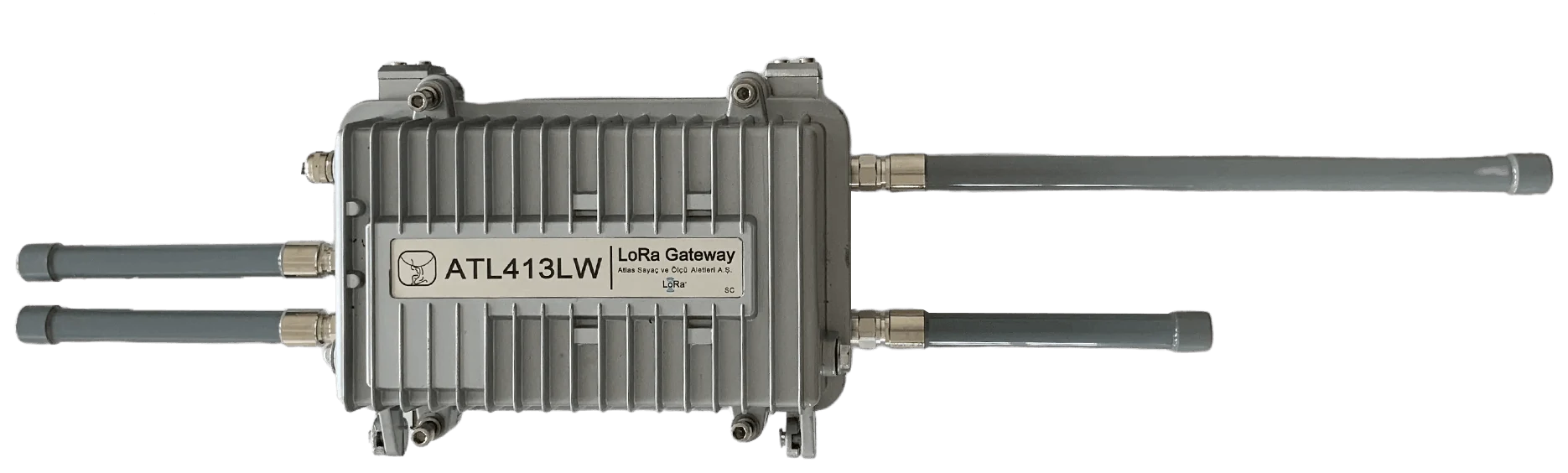
The ATL413LW gateway connects every controller on site to the cloud. It supports up to 25,000 devices. It reaches the cloud over 4G, Wi-Fi or Ethernet (PoE). The housing is IP67 die-cast aluminium. An optional solar panel can power it.
LoRaWAN is an open standard. Other LoRaWAN devices can join the same network. See open standard and LoRa range.
Web panel and mobile app
The whole site appears on a map. Programs are sent to hundreds of valves at once. Reports, alarms and AI decisions are followed in one place. The mobile app runs on iOS and Android and connects to a valve directly over Bluetooth on site. Details on the landscape irrigation software page.

Sensors
Rain, soil moisture, pressure, flow and temperature sensors connect to the controller. The rain sensor postpones watering in rain. The soil moisture sensor prevents unnecessary watering. The flow sensor enables leak detection: flow while the valve is closed raises an alarm. See catch water leaks without visiting the site.
How is it installed?
Installation does not change the existing irrigation infrastructure. Pipes, sprinklers and solenoid valves stay where they are.
- Site survey. We assess the site together. Valve count, line layout and gateway location are decided. Which lines get a flow sensor, and the watering window, are settled at this step. If there is an existing timer, its schedule is noted; the first reference duration comes from there.
- Gateway. The gateway is placed at a high, open point. A rooftop or a mast works well. Power and internet (4G, Ethernet) are connected; a solar panel option exists.
- Valve controllers. One controller is fitted to each solenoid valve. Batteries go in; no cables are pulled. The controller sits in the valve box, next to the solenoid.
- Panel setup. Areas and irrigation lines are entered in the panel. A schedule or AI mode is selected. A reference duration and rules are set per line: wind limit, no-watering days, time window.
- Monitoring. In the first days, decisions and the site are watched together. Rules are adjusted if needed. Each line is opened once from the panel and the sprinklers are checked.
Large sites can start with a pilot zone. Other zones are added once results are seen. Moving up from a timer or a sensor system: upgrading without replacing the system.
How much water does it save?
Compared with fixed-schedule irrigation, up to 40% less water is used. Savings come from three places:
- No watering on days when rain is expected.
- Watering is skipped when soil moisture is sufficient.
- Duration is shorter on cool days and only as long as needed on hot days.
Water savings also mean energy savings. Less pump running time, less electricity. Details: how water is saved.
Labour savings matter too. Valves open and close without a site visit. Faults show up in the panel. The field team goes out only when needed.
Comparison table: timer and ESTRON
| Feature | Timer-based irrigation | ESTRON smart irrigation |
|---|---|---|
| Decision | Fixed time and duration | AI decision every day, for every line |
| Season | Schedule changed by hand | Duration grows as it warms up, shrinks as it cools |
| Rain | Watering continues | Postponed when rain is expected |
| Control | On site, at the device | Remote: web panel and mobile app |
| Cabling | Usually required | Battery-powered controller, no cables |
| Faults | Noticed on site | Detected from flow data in the panel |
| Records | None | Every decision logged with its reason |
Remote control: Bluetooth on site, LoRaWAN from the office
Remote irrigation control uses two channels. The field team connects with the mobile app over Bluetooth, within 10 m of the valve. No internet is needed to upload a program.
The office team uses the web panel. Valves appear on a map. One program is sent to hundreds of valves at once. Opening, closing and changing durations is done without a site visit.
The two channels complement each other. Even a single valve outside gateway coverage is managed over Bluetooth on site. Tasks are prepared in the office and delivered automatically to devices that come into range as you walk the site.
Scattered sites become one wireless central irrigation control system. Comparison with wired systems: central irrigation control system.
Reporting and audit trail
Every valve action is recorded with date and time. Irrigation durations are charted by date range. Device and program lists export to Excel.
AI decisions are kept with their reasons. Why a line was not watered on a given day can be seen later. This record provides ready data for internal audits and water budget reports.
Alarms are collected in one list: low battery, unreachable device, undelivered command and leak. Notifications go to the right people by mobile app, e-mail and SMS. Details: detailed reporting.
Security and data
Data transmission is encrypted. Every device carries a unique identity. Valve controllers are password protected; a stolen device cannot be used in another account.
Panel permissions are role based. Each user sees and manages only their own area. Several sites and clients share one panel but stay separate.
Organisations can host the software on their own server if they prefer. Integration with existing SCADA systems is possible. Details: secure connection and integration with the organisation's systems.
Investment and payback
Moving to a smart irrigation system keeps the existing infrastructure. The investment in pipes, sprinklers and valves stays in place. The cost is limited to one controller per valve and one gateway per site.
Payback comes from three items: the water bill, pump electricity and field labour. Maintenance visits drop because faults are seen without going to the site. Water loss is shorter because leaks are caught early.
On large sites a pilot zone is the usual way to start. One season of records supports the decision with numbers.
Cost factors are explained on the smart irrigation system cost page.
Points to watch during installation
- Gateway location. Choose a high, open point. Buildings and trees shorten the range.
- Battery tracking. Battery level shows in the panel. Replace the battery when the alarm arrives; irrigation is not interrupted.
- Sensor placement. Put the rain sensor in the open and the soil moisture sensor at a representative spot.
- Rules. Write site-specific rules from the start: wind limit, no-watering days, night watering.
- Staged transition. Watch the decisions together in the first week. Then switch fully to AI mode.
- The gateway needs line of sight. Dense buildings or earth fill between a valve box and the gateway weaken the signal. Coverage is measured at the survey; if needed a second gateway is added, or that valve is managed on site over Bluetooth.
- A sensor in the wrong place reads wrong. A soil moisture sensor at the foot of a sprinkler always shows the site wet; a rain sensor under a tree never sees rain. Testing matters as much as placement.
- Battery tracking is your job. The controller runs for years, but the battery is not endless. When the alarm comes, someone has to go to site; if nobody watches the alarm, the line does not water.
- On a very small single line the gain is small. In a small area with one valve a fixed schedule is often enough. The gain grows with the number of lines, how scattered they are and the cost of site visits.
These limits are discussed at the survey; the quote is prepared accordingly.
Who uses it?
Municipalities manage parks, road medians and public gardens from one panel. See smart irrigation for municipalities.
Landscaping companies follow several sites and clients in the same panel. See for landscaping companies.
Residential estates automate common-area irrigation. You can browse our reference projects.
Technical topics one by one: Why ESTRON?
Frequently asked questions
Answers on battery life, range, compatibility with existing valves and installation time are on the FAQ page. Get a quote for your project.
Get a quote for your project.
Tell us the area size and number of valves and we will get back to you.